タイムライン
- 2024/02/21 00:46:59 JST (SLACK)__alertチャンネルにMackerelから'Ping CRITCAL'のアラート発生.

-
2024/02/21 12:30:00 JST (小山)サーバへSSHで接続し調査を開始
-
2024/02/21 16:57:59 JST (SLACK) __alertチャンネルにMackerelから'Ping OK'のメッセージ.

- 2024/02/21 16:59:00 JST (小山さん) 復旧完了済み
調査
cdsl-vm-2 (OpenVPNサーバ)のログ
ログファイル /var/log/openvpn.log を確認した.
2024-02-21 12:44:41 --user specified but lacking CAP_SETPCAP. Cannot retain CAP_NET_ADMIN. Disabling data channel offload
2024-02-21 12:44:41 OpenVPN 2.6.2 x86_64-pc-linux-gnu [SSL (OpenSSL)] [LZO] [LZ4] [EPOLL] [PKCS11] [MH/PKTINFO] [AEAD] [DCO]
2024-02-21 12:44:41 library versions: OpenSSL 1.1.1f  31 Mar 2020, LZO 2.10
2024-02-21 12:44:41 DCO version: N/A
2024-02-21 12:44:41 net_route_v4_best_gw query: dst 0.0.0.0
2024-02-21 12:44:41 net_route_v4_best_gw result: via 10.146.0.1 dev ens4
2024-02-21 12:44:41 Diffie-Hellman initialized with 2048 bit key
2024-02-21 12:44:41 WARNING: Your certificate has expired!
2024-02-21 12:44:41 CRL: loaded 1 CRLs from file /etc/openvpn/EasyRSA-3.0.8/pki/crl.pem
2024-02-21 12:44:41 net_route_v4_best_gw query: dst 0.0.0.0
2024-02-21 12:44:41 net_route_v4_best_gw result: via 10.146.0.1 dev ens4
2024-02-21 12:44:41 ROUTE_GATEWAY 10.146.0.1
2024-02-21 12:44:41 TUN/TAP device tun0 opened
2024-02-21 12:44:41 net_iface_mtu_set: mtu 1500 for tun0
2024-02-21 12:44:41 net_iface_up: set tun0 up
2024-02-21 12:44:41 net_addr_v4_add: 192.168.200.1/24 dev tun0
2024-02-21 12:44:41 net_route_v4_add: 192.168.100.0/24 via 192.168.200.2 dev [NULL] table 0 metric -1
2024-02-21 12:44:41 net_route_v4_add: 192.168.201.0/24 via 192.168.200.2 dev [NULL] table 0 metric -1
2024-02-21 12:44:41 Socket Buffers: R=[212992->212992] S=[212992->212992]
2024-02-21 12:44:41 UDPv4 link local (bound): [AF_INET][undef]:1194
2024-02-21 12:44:41 UDPv4 link remote: [AF_UNSPEC]
2024-02-21 12:44:41 UID set to nobody
2024-02-21 12:44:41 GID set to nogroup
2024-02-21 12:44:41 Capabilities retained: CAP_NET_ADMIN
2024-02-21 12:44:41 MULTI: multi_init called, r=256 v=256
2024-02-21 12:44:41 IFCONFIG POOL IPv4: base=192.168.200.2 size=253
2024-02-21 12:44:41 ifconfig_pool_read(), in='a910-router,192.168.200.2,'
2024-02-21 12:44:41 succeeded -> ifconfig_pool_set(hand=0)
2024-02-21 12:44:41 IFCONFIG POOL LIST
2024-02-21 12:44:41 a910-router,192.168.200.2,
2024-02-21 12:44:41 Initialization Sequence Completed
2024-02-21 12:47:33 163.215.6.1:35301 WARNING: Failed to stat CRL file, not reloading CRL.
2024-02-21 12:47:33 163.215.6.1:35301 WARNING: Failed to stat CRL file, not reloading CRL.
2024-02-21 12:47:35 read UDPv4 [ECONNREFUSED]: Connection refused (fd=6,code=111)
2024-02-21 12:47:39 read UDPv4 [ECONNREFUSED]: Connection refused (fd=6,code=111)
2024-02-21 12:47:47 read UDPv4 [ECONNREFUSED]: Connection refused (fd=6,code=111)
2024-02-21 12:48:03 read UDPv4 [ECONNREFUSED]: Connection refused (fd=6,code=111)
2024-02-21 12:48:33 163.215.6.1:35301 TLS Error: TLS key negotiation failed to occur within 60 seconds (check your network connectivity)
2024-02-21 12:48:33 163.215.6.1:35301 TLS Error: TLS handshake failed
2024-02-21 12:48:33 163.215.6.1:35301 WARNING: Failed to stat CRL file, not reloading CRL.
2024-02-21 12:48:33 163.215.6.1:35301 SIGUSR1[soft,tls-error] received, client-instance restarting
2024-02-21 12:48:53 163.215.6.1:59245 WARNING: Failed to stat CRL file, not reloading CRL.
2024-02-21 12:48:53 163.215.6.1:59245 WARNING: Failed to stat CRL file, not reloading CRL.
2024-02-21 12:48:56 read UDPv4 [ECONNREFUSED]: Connection refused (fd=6,code=111)
2024-02-21 12:48:58 163.215.6.1:38260 WARNING: Failed to stat CRL file, not reloading CRL.
2024-02-21 12:48:58 163.215.6.1:38260 WARNING: Failed to stat CRL file, not reloading CRL.
2024-02-21 12:49:00 read UDPv4 [ECONNREFUSED]: Connection refused (fd=6,code=111)
2024-02-21 12:49:00 read UDPv4 [ECONNREFUSED]: Connection refused (fd=6,code=111)
2024-02-21 12:49:03 163.215.6.1:41948 WARNING: Failed to stat CRL file, not reloading CRL.
2024-02-21 12:49:03 163.215.6.1:41948 WARNING: Failed to stat CRL file, not reloading CRL.
2024-02-21 12:49:04 read UDPv4 [ECONNREFUSED]: Connection refused (fd=6,code=111)
ログの以下が気になった.
2024-02-21 12:44:41 WARNING: Your certificate has expired!
検索したところ以下が見つかった.
OpenVPNの設定ファイル
以下に2023年3月にバックアップした設定ファイルが見つかった.
openvpn-config-backup/20230330 at master · cdsl-research/openvpn-config-backup
発行された証明書 a910-router.crt を確認すると,期限が2024年2月20日 22:28:44 UTCとなっていた.
Not After : Feb 20 22:28:44 2024 GMT
Easy RSAの設定ファイル vars では,前回の設定を行った際の3650日が指定してあった.
# In how many days should the root CA key expire?

set_var EASYRSA_CA_EXPIRE   3650

# In how many days should certificates expire?

set_var EASYRSA_CERT_EXPIRE 3650

# How many days until the next CRL publish date?  Note that the CRL can still be
# parsed after this timeframe passes. It is only used for an expected next
# publication date.
set_var EASYRSA_CRL_DAYS    3650
Router(OpenVPNクライアント)のログ
Feb 21 00:04:08 vpnclient4[19146]: TLS Error: TLS object -> incoming plaintext read error
Feb 21 00:04:08 vpnclient4[19146]: TLS Error: TLS handshake failed
Feb 21 00:04:11 vpnclient4[19146]: TLS Error: Unroutable control packet received from [AF_INET]34.84.68.226:1194 (si=3 op=P_CONTROL_V1)
Feb 21 00:04:15 vpnclient4[19146]: TLS Error: Unroutable control packet received from [AF_INET]34.84.68.226:1194 (si=3 op=P_CONTROL_V1)
Feb 21 00:04:23 vpnclient4[19146]: TLS Error: Unroutable control packet received from [AF_INET]34.84.68.226:1194 (si=3 op=P_ACK_V1)
Feb 21 00:04:24 vpnclient4[19146]: TLS Error: Unroutable control packet received from [AF_INET]34.84.68.226:1194 (si=3 op=P_CONTROL_V1)
Feb 21 00:04:25 vpnclient4[19146]: TLS Error: Unroutable control packet received from [AF_INET]34.84.68.226:1194 (si=3 op=P_ACK_V1)
Feb 21 00:04:29 vpnclient4[19146]: TLS Error: Unroutable control packet received from [AF_INET]34.84.68.226:1194 (si=3 op=P_ACK_V1)
Feb 21 00:04:37 vpnclient4[19146]: TLS Error: Unroutable control packet received from [AF_INET]34.84.68.226:1194 (si=3 op=P_ACK_V1)
Feb 21 00:04:40 vpnclient4[19146]: TLS Error: Unroutable control packet received from [AF_INET]34.84.68.226:1194 (si=3 op=P_CONTROL_V1)
Feb 21 00:04:53 vpnclient4[19146]: TLS Error: Unroutable control packet received from [AF_INET]34.84.68.226:1194 (si=3 op=P_ACK_V1)
Feb 21 00:05:23 vpnclient4[19146]: TLS Error: TLS key negotiation failed to occur within 60 seconds (check your network connectivity)
Feb 21 00:05:23 vpnclient4[19146]: TLS Error: TLS handshake failed
Feb 21 00:05:24 vpnclient4[19146]: TLS: Initial packet from [AF_INET]34.84.68.226:1194, sid=b77bfcca 1ca6d812
Feb 21 00:05:24 vpnclient4[19146]: VERIFY OK: depth=1, CN=cdsl-vm-2
Feb 21 00:05:24 vpnclient4[19146]: VERIFY ERROR: depth=0, error=certificate has expired: CN=cdsl-vm-2, serial=46194363378598349251884152160368321694
Feb 21 00:05:24 vpnclient4[19146]: OpenSSL: error:1416F086:lib(20):func(367):reason(134)
Feb 21 00:05:24 vpnclient4[19146]: TLS_ERROR: BIO read tls_read_plaintext error
Feb 21 00:05:24 vpnclient4[19146]: TLS Error: TLS object -> incoming plaintext read error
Feb 21 00:05:24 vpnclient4[19146]: TLS Error: TLS handshake failed
VERIFY OKとなっているがその後VERIFY ERRORとなっていており, エラーにcertificate has expiredとなっていた.
対処
Easy-RSAのサーバー証明書とクライアント証明書を再発行する.
クラウドユーザーガイド(ネットワーク:リモートアクセスVPNゲートウェイ:Easy-RSAを使った自己署名証明書作成手順) | ニフクラ
(1) cdsl-vm-2にSSHしてrootに昇格する.
$ sudo -i
(2) OpenVPNの設定ディレクトリに移動する.
# cd /etc/openvpn/EasyRSA-3.0.8
(3) サーバ証明書を作成する.Common Name (CN) に server を指定した.
# ./easyrsa gen-req server nopass

Note: using Easy-RSA configuration from: /etc/openvpn/EasyRSA-3.0.8/vars
Using SSL: openssl OpenSSL 1.1.1f  31 Mar 2020
Generating a RSA private key
...................................+++++
.....................+++++
writing new private key to '/etc/openvpn/EasyRSA-3.0.8/pki/easy-rsa-2512401.5bXPKI/tmp.fnkwCi'
-----
You are about to be asked to enter information that will be incorporated
into your certificate request.
What you are about to enter is what is called a Distinguished Name or a DN.
There are quite a few fields but you can leave some blank
For some fields there will be a default value,
If you enter '.', the field will be left blank.
-----
Common Name (eg: your user, host, or server name) [server]:cdsl-vm-2

Keypair and certificate request completed. Your files are:
req: /etc/openvpn/EasyRSA-3.0.8/pki/reqs/server.req
key: /etc/openvpn/EasyRSA-3.0.8/pki/private/server.key
(4) サーバ証明書の署名要求をインポートする.
# ./easyrsa import-req pki/reqs/server.req cdsl-vm-2

Note: using Easy-RSA configuration from: /etc/openvpn/EasyRSA-3.0.8/vars
Using SSL: openssl OpenSSL 1.1.1f  31 Mar 2020

The request has been successfully imported with a short name of: cdsl-vm-2
You may now use this name to perform signing operations on this request.
(5) サーバー証明書に署名する.
# ./easyrsa sign-req server cdsl-vm-2

Note: using Easy-RSA configuration from: /etc/openvpn/EasyRSA-3.0.8/vars
Using SSL: openssl OpenSSL 1.1.1f  31 Mar 2020


You are about to sign the following certificate.
Please check over the details shown below for accuracy. Note that this request
has not been cryptographically verified. Please be sure it came from a trusted
source or that you have verified the request checksum with the sender.

Request subject, to be signed as a server certificate for 3650 days:

subject=
    commonName                = cdsl-vm-2


Type the word 'yes' to continue, or any other input to abort.
  Confirm request details: yes
Using configuration from /etc/openvpn/EasyRSA-3.0.8/pki/easy-rsa-2518548.1iZ42S/tmp.AU8jcB
Check that the request matches the signature
Signature ok
The Subject's Distinguished Name is as follows
commonName            :ASN.1 12:'cdsl-vm-2'
Certificate is to be certified until Feb 18 07:45:16 2034 GMT (3650 days)

Write out database with 1 new entries
Data Base Updated

Certificate created at: /etc/openvpn/EasyRSA-3.0.8/pki/issued/cdsl-vm-2.crt
以下のメッセージがあるので3650日が反映されていそう.
Request subject, to be signed as a server certificate for 3650 days:
(6) クライアント証明書を発行する.
# ./easyrsa gen-req client nopass

Note: using Easy-RSA configuration from: /etc/openvpn/EasyRSA-3.0.8/vars
Using SSL: openssl OpenSSL 1.1.1f  31 Mar 2020
Generating a RSA private key
...............................+++++
...................+++++
writing new private key to '/etc/openvpn/EasyRSA-3.0.8/pki/easy-rsa-2518925.99uhXw/tmp.XsBkHb'
-----
You are about to be asked to enter information that will be incorporated
into your certificate request.
What you are about to enter is what is called a Distinguished Name or a DN.
There are quite a few fields but you can leave some blank
For some fields there will be a default value,
If you enter '.', the field will be left blank.
-----
Common Name (eg: your user, host, or server name) [client]:a910-router

Keypair and certificate request completed. Your files are:
req: /etc/openvpn/EasyRSA-3.0.8/pki/reqs/client.req
key: /etc/openvpn/EasyRSA-3.0.8/pki/private/client.key
(7) クライアント証明書の署名要求をインポートする.
# ./easyrsa import-req pki/reqs/client.req a910-router

Note: using Easy-RSA configuration from: /etc/openvpn/EasyRSA-3.0.8/vars
Using SSL: openssl OpenSSL 1.1.1f  31 Mar 2020

The request has been successfully imported with a short name of: a910-router
You may now use this name to perform signing operations on this request.
(8) クライアント証明書に署名する.
# ./easyrsa sign-req client a910-router

Note: using Easy-RSA configuration from: /etc/openvpn/EasyRSA-3.0.8/vars
Using SSL: openssl OpenSSL 1.1.1f  31 Mar 2020


You are about to sign the following certificate.
Please check over the details shown below for accuracy. Note that this request
has not been cryptographically verified. Please be sure it came from a trusted
source or that you have verified the request checksum with the sender.

Request subject, to be signed as a client certificate for 3650 days:

subject=
    commonName                = a910-router


Type the word 'yes' to continue, or any other input to abort.
  Confirm request details: yes
Using configuration from /etc/openvpn/EasyRSA-3.0.8/pki/easy-rsa-2519044.Qt6Vy1/tmp.1V8qOM
Check that the request matches the signature
Signature ok
The Subject's Distinguished Name is as follows
commonName            :ASN.1 12:'a910-router'
Certificate is to be certified until Feb 18 07:53:10 2034 GMT (3650 days)

Write out database with 1 new entries
Data Base Updated

Certificate created at: /etc/openvpn/EasyRSA-3.0.8/pki/issued/a910-router.crt
(9) 署名済みのサーバとクライアントの証明書の期限を確認する.
# grep After pki/issued/*.crt
pki/issued/a910-router.crt:            Not After : Feb 18 05:59:16 2034 GMT
pki/issued/cdsl-vm-2.crt:            Not After : Feb 18 05:52:34 2034 GMT
(10) ルータの管理画面からVPN設定をひらく.
ルータの管理画面にアクセスしてVPNをみる.メニューの「VPN→VPNフュージョン」を選ぶ.
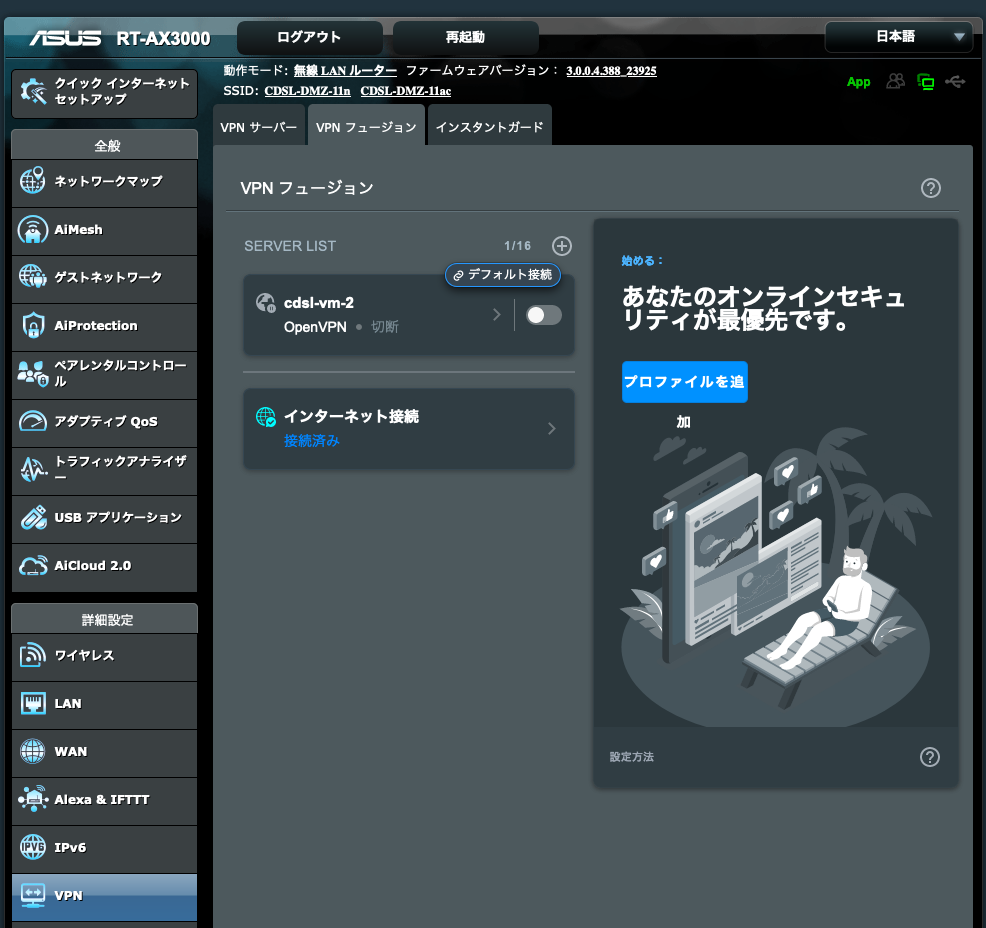
(12) OpenVPNの設定ファイルを修正する.
/etc/openvpn/server.confで生成したファイルのファイル名をアップデートする.
; key configs
; see also: https://cdsl-tut.esa.io/wiki/1581#%E5%AF%BE%E5%87%A6
ca          /etc/openvpn/EasyRSA-3.0.8/pki/ca.crt
key         /etc/openvpn/EasyRSA-3.0.8/pki/private/server.key
cert        /etc/openvpn/EasyRSA-3.0.8/pki/issued/cdsl-vm-2.crt
dh          /etc/openvpn/EasyRSA-3.0.8/pki/dh.pem
crl-verify  /etc/openvpn/EasyRSA-3.0.8/pki/crl.pem
設定後に以下のコマンドでOpenVPNを再起動する.
$ sudo systemctl restart openvpn@server
(11) OpenVPNの接続に必要な情報を取得する.
CA証明書を取得する.
root@cdsl-vm-2:/etc/openvpn/EasyRSA-3.0.8/pki# cat ca.crt
-----BEGIN CERTIFICATE-----
ここにCAの証明書が表示される
-----END CERTIFICATE-----
クライアント証明書を取得する.
# tail -20  issued/a910-router.crt
-----BEGIN CERTIFICATE-----
ここに署名されたクライアント証明書が表示される
-----END CERTIFICATE-----
クライアント秘密鍵を取得する.
root@cdsl-vm-2:/etc/openvpn/EasyRSA-3.0.8/pki# cat private/client.key
-----BEGIN PRIVATE KEY-----
ここにクライアント秘密鍵が表示される
-----END PRIVATE KEY-----
(13) ルータのVPN設定画面から設定を行う.
CA認証にCA証明書を貼る. クライアント証明書にクライアント証明書を貼る. クライアントキーにクライアント秘密鍵を貼る.
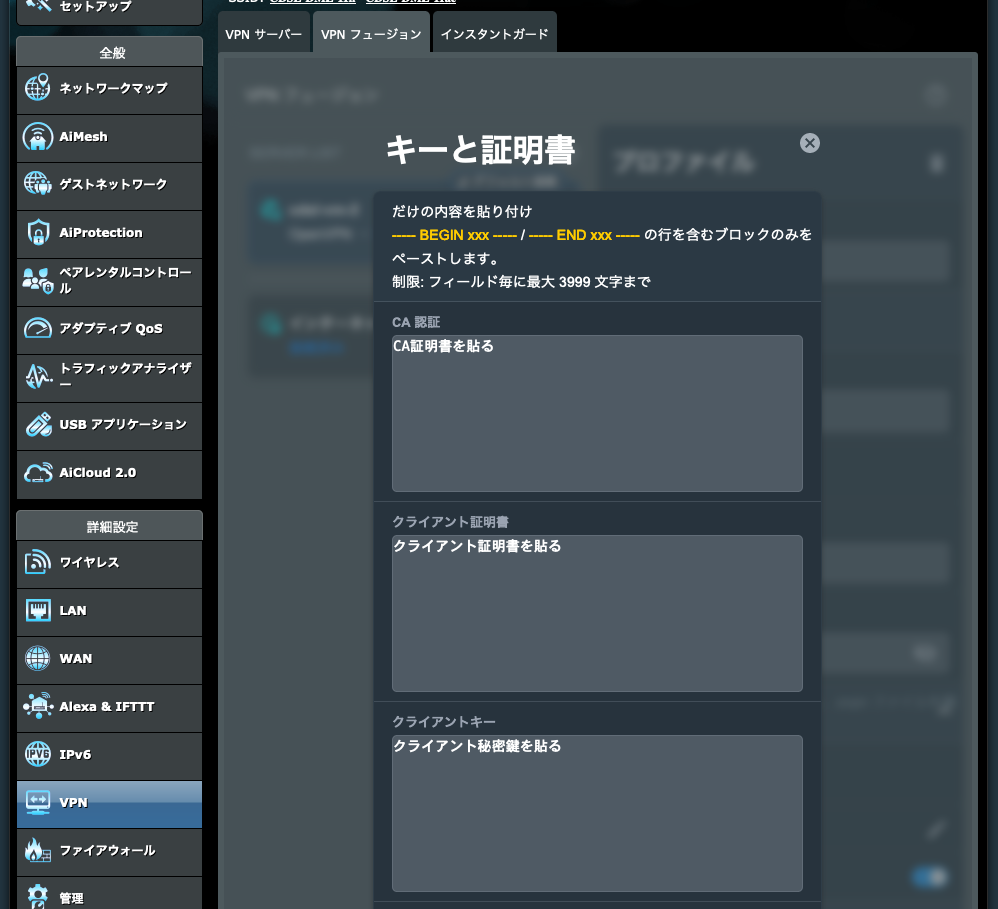
設定を保存して接続を行う.
(14) cdsl-vm-2で/var/log/openvpn.logをみて確認してみる.
以下のログが出て接続ができた.
$ sudo tail -20 /var/log/openvpn.log

$ sudo tail -n 20 /var/log/openvpn.log
2024-02-21 16:57:18 163.215.6.1:36800 peer info: IV_COMP_STUBv2=1
2024-02-21 16:57:18 163.215.6.1:36800 peer info: IV_TCPNL=1
2024-02-21 16:57:18 163.215.6.1:36800 TLS: move_session: dest=TM_ACTIVE src=TM_INITIAL reinit_src=1
2024-02-21 16:57:18 163.215.6.1:36800 WARNING: Failed to stat CRL file, not reloading CRL.
2024-02-21 16:57:18 163.215.6.1:36800 TLS: tls_multi_process: initial untrusted session promoted to trusted
2024-02-21 16:57:18 163.215.6.1:36800 Control Channel: TLSv1.3, cipher TLSv1.3 TLS_AES_256_GCM_SHA384, peer certificate: 2048 bit RSA, signature: RSA-SHA256
2024-02-21 16:57:18 163.215.6.1:36800 [a910-router] Peer Connection Initiated with [AF_INET]163.215.6.1:36800
2024-02-21 16:57:18 a910-router/163.215.6.1:36800 MULTI_sva: pool returned IPv4=192.168.200.2, IPv6=(Not enabled)
2024-02-21 16:57:18 a910-router/163.215.6.1:36800 OPTIONS IMPORT: reading client specific options from: ccd/a910-router
2024-02-21 16:57:18 a910-router/163.215.6.1:36800 MULTI: Learn: 192.168.200.2 -> a910-router/163.215.6.1:36800
2024-02-21 16:57:18 a910-router/163.215.6.1:36800 MULTI: primary virtual IP for a910-router/163.215.6.1:36800: 192.168.200.2
2024-02-21 16:57:18 a910-router/163.215.6.1:36800 MULTI: internal route 192.168.201.0/24 -> a910-router/163.215.6.1:36800
2024-02-21 16:57:18 a910-router/163.215.6.1:36800 MULTI: Learn: 192.168.201.0/24 -> a910-router/163.215.6.1:36800
2024-02-21 16:57:19 a910-router/163.215.6.1:36800 Data Channel: cipher 'AES-256-GCM', peer-id: 0
2024-02-21 16:57:19 a910-router/163.215.6.1:36800 Timers: ping 10, ping-restart 240
2024-02-21 16:57:19 a910-router/163.215.6.1:36800 PUSH: Received control message: 'PUSH_REQUEST'
2024-02-21 16:57:19 a910-router/163.215.6.1:36800 SENT CONTROL [a910-router]: 'PUSH_REPLY,redirect-gateway def1 bypass-dhcp,route 10.146.0.0 255.255.240.0,dhcp-option DNS 1.1.1.1,route-gateway 192.168.200.1,topology subnet,ping 10,ping-restart 120,ifconfig 192.168.200.2 255.255.255.0,peer-id 0,cipher AES-256-GCM' (status=1)
2024-02-21 16:57:25 MULTI: Learn: 192.168.201.8 -> a910-router/163.215.6.1:36800
2024-02-21 16:57:49 MULTI: Learn: 192.168.201.1 -> a910-router/163.215.6.1:36800
2024-02-21 16:58:20 MULTI: Learn: 192.168.201.4 -> a910-router/163.215.6.1:36800
注意事項
- クライアント証明書のCommon Nameで指定した値が,CCDのファイル名に対応する.Common Nameで指定した名前が /var/log/openvpn-status.log で表示されるクライアント名に対応する.
- EasyRSAで使っているOpenSSLのバージョンが1.1.1fなので,EOLをすでに迎えている.そのためバージョンアップを検討する.
- Configのバックアップは以下に配置しておいた.
- OVPNファイルを探したところ見つけたので以下に証明書を取り除いて貼り付けておく.
# クライアントモードであることを宣言
client
# VPNプロトコル:ルーティング方式.
dev tun
# 通信プロトコル: UDP.
proto udp
# グローバルIPアドレスを指定する.「1. 準備」で調べたIP.
remote 34.84.68.226 1194
# 接続の継続.
resolv-retry infinite
# ポート番号をバインドしない.ほとんどの場合はこうらしい.
nobind
# 切断後の動作指定
persist-key
persist-tun
# 認証局証明書
<ca>

</ca>
# クライアント証明書
<cert>

</cert>
# クライアント認証鍵
<key>

</key>
# ログレベル
verb 3