資料
Docker入門
- Dockerコンテナの必要性と基礎 - IBM
- Dockerハンズオン - IBM
- サイボウズ 新卒研修資料 docker
- 【連載】世界一わかりみが深いコンテナ & Docker入門 〜 その1:コンテナってなに? 〜 | SIOS Tech. Lab
- 世界一わかりみの深いコンテナ&Docker&Kubernetes入門
- 入門 Docker
はてなリモートインターン2020 講義2「コンテナ」
Kubernetes入門
- 今こそ始めよう! Kubernetes入門 記事一覧 | Think IT(シンクイット)
- CyberAgentの青山さんの記事
- kubernetes-dojo - Toku's Blog
- CyberAgentの徳田さんの記事
- Real World Container for GTB2020
- GMOの元内さんのスライド
- Kubernetesの基礎
- IBMの高良さんのスライド(レクチャー)
- Kubernetesハンズオン
- IBMの高良さんのスライド(ハンズオン)
- [Kubernetesで切り開くアプリケーション配信の明るい未来]
- サイボウズ 新卒研修資料 k8s
- サイボウズの新卒研修で使われた資料
- [wip] Kubernetes 勉強会&ハンズオン@CDSL - Qiita
- koyamaの自作資料
はてなリモートインターン2020 講義3「Kubernetes」
Kubernetes応用
マイクロサービス
ストレージ
- 失敗しない!Kubernetes向けストレージ選び5つのポイント - Speaker Deck
- hostPathとlocalのPersistentVolumeの違い - Qiita
- Operator でどう変わる? これからのデータベース運用 / cndt2019_k8s_operator
Cheat Sheet
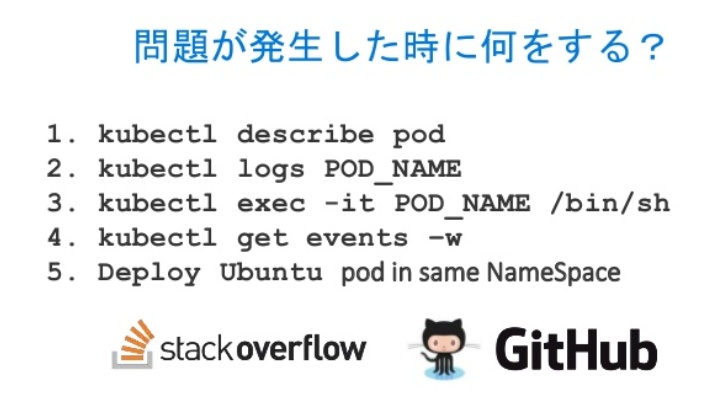
Tips
- Dockerfileのベストプラクティス Top 20
- Kubernetes 専門家として知るべき 47 のこと - 誰かの役に立てばいいブログ
- 40 topics of Kubernetes in 40 minutes
- Alpine問題
- Dockerfileを改善するためのBest Practice 2019年版
- お前のDockerイメージはまだ重い💢💢💢 - Speaker Deck
- 〜のとき何が起きるのか ... Kubernetes版!
- Kubernetesはクラスタで障害があったとき、どういう動きをするのか - あさのひとりごと
GKE
Kubernetesデザインパターン
- Top 10 must-know Kubernetes design patterns - Red Hat Developer
- Multi-Container Pod Design Patterns - CKAD Course
実装
- ゼロから始めるKubernetes Controller / Under the Kubernetes Controller - Speaker Deck
- つくって学ぶKubebuilder · HonKit
- Kubernetesのコードリーディングをする上で知っておくと良さそうなこと | Medium
- Kubernetesネットワーク 徹底解説
- Kubernetes Internal - YouTube
- そのコンテナ、もっと「賢く」置けますよ? #CNDT2019 / CloudNative Days Tokyo 2019 - Speaker Deck
- 図で理解する Descheduler #k8sjp #ymju / Introduction to Descheduler - Speaker Deck
- [1B1] Kubernetes ネットワーキングのすべて - YouTube
テスト用Dockerイメージ
ホスト名を返す
- https://github.com/adongy/hostname-docker
- https://hub.docker.com/r/nginxdemos/hello/
- https://registry.hub.docker.com/r/pmorjan/demo
- https://github.com/paulbouwer/hello-kubernetes
- https://github.com/brndnmtthws/nginx-echo-headers
- https://github.com/mccutchen/go-httpbin
Kubernetes操作
チートシート: https://kubernetes.io/docs/reference/kubectl/cheatsheet/
リソースの操作
作成/更新
kubectl apply -f xxx.yaml
削除
kubectl delete -f xxx.yaml
ネームスペースの操作
新規作成
kubectl create namespace <namespace>
確認(一覧)
kubectl get ns
デフォルトネームスペースを変更
kubectl config set-context --current --namespace=dev-koyama
現在のネームスペースを取得
kubectl config view -o jsonpath='{.contexts[].context.namespace}' ; echo
コンテキストの操作
現在のコンテキスト
kubectl config current-context
利用できるコンテキスト一覧
kubectl config get-contexts
使用するコンテキストを設定
kubectl config use-context <CONTEXT_NAME>
クラスタの操作
現在の設定を確認
kubectl config get-contexts
設定を変更
kubectl config use-context docker-desktop
コンテナでコマンドを実行
podが複数コンテナの場合
kubectl exec <pod_name> --container <container_name> -- <command>
podが単一コンテナの場合
kubectl exec <pod_name> -- <command>
コンテナのシェルに入る
podが複数コンテナの場合
kubectl exec -it <pod_name> --container <container_name> -- /bin/bash
podが単一コンテナの場合
kubectl exec -it <pod_name> -- /bin/bash
レプリカ数の変更
kubectl scale --replicas=1 -f rs.yaml
デバッグ用コンテナを1つデプロイ
--rm をつけるとexitするとコンテナが消える.
kubectl run -it --rm ubuntu --image=ubuntu:18.04 /bin/bash
kubectl run -it --rm bb -n site2021 --image=busybox sh
Kubernetesサンプル設定ファイル
- Kubernetesのマニフェストを書く時に見るリンク集 - Qiita
- Service(Cluseter IP) + Deployment
- k3s上にNginx Ingressを使ってWebアプリをデプロイ - Qiita
Deployment
https://github.com/MasayaAoyama/kubernetes-perfect-guide/blob/master/samples/chapter05/sample-deployment.yaml
apiVersion: apps/v1
kind: Deployment
metadata:
  name: sample-deployment
spec:
  replicas: 3
  selector:
    matchLabels:
      app: sample-app
  template:
    metadata:
      labels:
        app: sample-app
    spec:
      containers:
        - name: nginx-container
          image: nginx:1.12
          ports:
            - containerPort: 80
Service(Cluster IP)
https://github.com/MasayaAoyama/kubernetes-perfect-guide/blob/344391704dd78bbdd92dd5c0b2fd143a6633c374/samples/chapter06/sample-clusterip.yaml
apiVersion: v1
kind: Service
metadata:
  name: sample-clusterip
spec:
  type: ClusterIP
  ports:
    - name: "http-port"
      protocol: "TCP"
      port: 8080
      targetPort: 80
  selector:
    app: sample-app
curl http://<ip-address>:8080/
Service(NodePort)
https://github.com/MasayaAoyama/kubernetes-perfect-guide/blob/344391704dd78bbdd92dd5c0b2fd143a6633c374/samples/chapter06/sample-nodeport.yaml
apiVersion: v1
kind: Service
metadata:
  name: sample-nodeport
spec:
  type: NodePort
  ports:
    - name: "http-port"
      protocol: "TCP"
      port: 8080
      targetPort: 80
      nodePort: 30080
  selector:
    app: sample-app
curl http://<ip-address>:30080/