初めに
この資料はRedmineをリストアするための資料になります. バックアップ用のファイル,Helm,はすでにあることが前提で進めていきます.
リストア
今回は実際に以下のファイルを使用していきます. - all-dump.sql →mysqlのdump用ファイル - values.yaml →redmineを立てるときのvaluesファイル
- valuesファイルの編集
最初にvaluesファイルの修正を行います.ここは自分の設定したいようにしてください.→最悪めんどくさかったら以下をコピーでもいいよ
# Copyright Broadcom, Inc. All Rights Reserved.
# SPDX-License-Identifier: APACHE-2.0

## @section Global parameters
## Global Docker image parameters
## Please, note that this will override the image parameters, including dependencies, configured to use the global value
## Current available global Docker image parameters: imageRegistry, imagePullSecrets and storageClass
##

## @param global.imageRegistry Global Docker image registry
## @param global.imagePullSecrets Global Docker registry secret names as an array
## @param global.defaultStorageClass Global default StorageClass for Persistent Volume(s)
##
global:
  imageRegistry: ""
  ## E.g.
  ## imagePullSecrets:
  ##   - myRegistryKeySecretName
  ##
  imagePullSecrets: []
  defaultStorageClass: ""
  ## Security parameters
  ##
  security:
    ## @param global.security.allowInsecureImages Allows skipping image verification
    allowInsecureImages: false
  ## Compatibility adaptations for Kubernetes platforms
  ##
  compatibility:
    ## Compatibility adaptations for Openshift
    ##
    openshift:
      ## @param global.compatibility.openshift.adaptSecurityContext Adapt the securityContext sections of the deployment to make them compatible with Openshift restricted-v2 SCC: remove runAsUser, runAsGroup and fsGroup and let the platform use their allowed default IDs. Possible values: auto (apply if the detected running cluster is Openshift), force (perform the adaptation always), disabled (do not perform adaptation)
      ##
      adaptSecurityContext: auto
## @section Common parameters
##

## @param kubeVersion Override Kubernetes version
##
kubeVersion: ""
## @param nameOverride String to partially override common.names.fullname
##
nameOverride: ""
## @param fullnameOverride String to fully override common.names.fullname
##
fullnameOverride: ""
## @param commonLabels Labels to add to all deployed objects
##
commonLabels: {}
## @param commonAnnotations Annotations to add to all deployed objects
##
commonAnnotations: {}
## @param clusterDomain Default Kubernetes cluster domain
##
clusterDomain: cluster.local
## @param extraDeploy Array of extra objects to deploy with the release
##
extraDeploy: []
## @param usePasswordFiles Mount credentials as files instead of using environment variables
##
usePasswordFiles: true
## Enable diagnostic mode in the deployment
##
diagnosticMode:
  ## @param diagnosticMode.enabled Enable diagnostic mode (all probes will be disabled and the command will be overridden)
  ##
  enabled: false
  ## @param diagnosticMode.command Command to override all containers in the the deployment
  ##
  command:
    - sleep
  ## @param diagnosticMode.args Args to override all containers in the the deployment
  ##
  args:
    - infinity
## @section Redmine Configuration parameters
## Redmine settings based on environment variables
## ref: https://github.com/bitnami/containers/tree/main/bitnami/redmine#environment-variables

## Bitnami Redmine image
## ref: https://hub.docker.com/r/bitnami/redmine/tags/
## @param image.registry [default: REGISTRY_NAME] Redmine image registry
## @param image.repository [default: REPOSITORY_NAME/redmine] Redmine image repository
## @skip image.tag Redmine image tag (immutable tags are recommended)
## @param image.digest Redmine image digest in the way sha256:aa.... Please note this parameter, if set, will override the tag
## @param image.pullPolicy Redmine image pull policy
## @param image.pullScrets [array] Redmine image pull secrets
## @param image.debug Enable image debug mode
##
image:
  registry: docker.io
  repository: bitnami/redmine
  tag: 6.0.4-debian-12-r6
  digest: ""
  ## Specify a imagePullPolicy
  ## ref: https://kubernetes.io/docs/concepts/containers/images/#pre-pulled-images
  ##
  pullPolicy: IfNotPresent
  ## Optionally specify an array of imagePullSecrets.
  ## Secrets must be manually created in the namespace.
  ## ref: https://kubernetes.io/docs/tasks/configure-pod-container/pull-image-private-registry/
  ## e.g:
  ##
  # pullSecrets:
  #   - myRegistryKeySecretName
  pullSecrets: []
  ## Enable debug mode
  ##
  debug: false
## @param redmineUsername Redmine username
##
redmineUsername: user
## @param redminePassword Redmine user password
## Defaults to a random 10-character alphanumeric string if not set
##
redminePassword: ""
## @param redmineEmail Redmine user email
##
redmineEmail: user@example.com
## @param redmineLanguage Redmine default data language
##
redmineLanguage: en
## @param allowEmptyPassword Allow the container to be started with blank passwords
##
allowEmptyPassword: false
## SMTP mail delivery configuration
## ref: https://github.com/bitnami/containers/tree/main/bitnami/redmine/#smtp-configuration
## @param smtpHost SMTP server host
## @param smtpPort SMTP server port
## @param smtpUser SMTP username
## @param smtpPassword SMTP user password
## @param smtpProtocol SMTP protocol
##
smtpHost: ""
smtpPort: ""
smtpUser: ""
smtpPassword: ""
smtpProtocol: ""
## @param existingSecret Name of existing secret containing Redmine credentials
## NOTE: Must contain key `redmine-password`
## NOTE: When it's set, the `redminePassword` parameter is ignored
##
existingSecret: ""
## @param smtpExistingSecret The name of an existing secret with SMTP credentials
## NOTE: Must contain key `smtp-password`
## NOTE: When it's set, the `smtpPassword` parameter is ignored
##
smtpExistingSecret: ""
## @param customPostInitScripts Custom post-init.d user scripts
## NOTE: supported format is `.sh`
## NOTE: scripts are exclusively executed during the 1st boot of the container
## e.g:
## customPostInitScripts:
##   enable-logs.sh: |
##     #!/bin/bash
##     sed -i "s/;logfile/logfile/" /opt/bitnami/redmine/config/configuration.yml
##     ...
##
customPostInitScripts: {}
## @param command Override default container command (useful when using custom images)
##
command: []
## @param args Override default container args (useful when using custom images)
##
args: []
## @param extraEnvVars Array with extra environment variables to add to the Redmine container
## e.g:
##
# extraEnvVars:
#   - name: FOO
#     value: "bar"
extraEnvVars: []
## @param extraEnvVarsCM Name of existing ConfigMap containing extra env vars
##
extraEnvVarsCM: ""
## @param extraEnvVarsSecret Name of existing Secret containing extra env vars
##
extraEnvVarsSecret: ""
## @section Redmine deployment parameters

## @param replicaCount Number of Redmine replicas to deploy
## NOTE: ReadWriteMany PVC(s) are required if replicaCount > 1
##
replicaCount: 1
## Container ports
## @param containerPorts.http Redmine HTTP container port
##
containerPorts:
  http: 3000
## Redmine containers' resource requests and limits
## ref: https://kubernetes.io/docs/concepts/configuration/manage-compute-resources-container/
## @param resourcesPreset Set container resources according to one common preset (allowed values: none, nano, micro, small, medium, large, xlarge, 2xlarge). This is ignored if resources is set (resources is recommended for production).
## More information: https://github.com/bitnami/charts/blob/main/bitnami/common/templates/_resources.tpl#L15
##
## resourcesPreset: "small"
## @param resources Set container requests and limits for different resources like CPU or memory (essential for production workloads)

##resources:
##  requests:
##    cpu: "500m"
##    memory: "512Mi"
##  limits:
##    cpu: "750m"
##    memory: "1Gi"

resources:
  requests:
    cpu: "500m"
    memory: "512Mi"
  limits:
    cpu: "750m"
    memory: "800Mi"
## Configure Pods Security Context
## ref: https://kubernetes.io/docs/tasks/configure-pod-container/security-context/#set-the-security-context-for-a-pod
## @param podSecurityContext.enabled Enabled Redmine pods' Security Context
## @param podSecurityContext.fsGroupChangePolicy Set filesystem group change policy
## @param podSecurityContext.sysctls Set kernel settings using the sysctl interface
## @param podSecurityContext.supplementalGroups Set filesystem extra groups
## @param podSecurityContext.fsGroup Set Redmine pod's Security Context fsGroup
##
podSecurityContext:
  enabled: true
  fsGroupChangePolicy: Always
  sysctls: []
  supplementalGroups: []
  fsGroup: 0
## Configure Container Security Context (only main container)
## ref: https://kubernetes.io/docs/tasks/configure-pod-container/security-context/#set-the-security-context-for-a-container
## @param containerSecurityContext.enabled Enabled containers' Security Context
## @param containerSecurityContext.seLinuxOptions [object,nullable] Set SELinux options in container
## @param containerSecurityContext.runAsUser Set containers' Security Context runAsUser
## @param containerSecurityContext.runAsGroup Set containers' Security Context runAsGroup
## @param containerSecurityContext.runAsNonRoot Set container's Security Context runAsNonRoot
## @param containerSecurityContext.privileged Set container's Security Context privileged
## @param containerSecurityContext.readOnlyRootFilesystem Set container's Security Context readOnlyRootFilesystem
## @param containerSecurityContext.allowPrivilegeEscalation Set container's Security Context allowPrivilegeEscalation
## @param containerSecurityContext.capabilities.drop List of capabilities to be dropped
## @param containerSecurityContext.capabilities.add List of capabilities to be added
## @param containerSecurityContext.seccompProfile.type Set container's Security Context seccomp profile
##
containerSecurityContext:
  enabled: true
  seLinuxOptions: {}
  runAsUser: 0
  runAsGroup: 0
  runAsNonRoot: false
  privileged: false
  readOnlyRootFilesystem: false
  allowPrivilegeEscalation: false
  capabilities:
    drop: ["ALL"]
    add: ["CHOWN", "SYS_CHROOT", "FOWNER", "SETGID", "SETUID", "DAC_OVERRIDE"]
  seccompProfile:
    type: "RuntimeDefault"
## Configure extra options for Redmine containers' liveness, readiness and startup probes
## ref: https://kubernetes.io/docs/tasks/configure-pod-container/configure-liveness-readiness-startup-probes/#configure-probes
## @param livenessProbe.enabled Enable livenessProbe on Redmine containers
## @param livenessProbe.initialDelaySeconds Initial delay seconds for livenessProbe
## @param livenessProbe.periodSeconds Period seconds for livenessProbe
## @param livenessProbe.timeoutSeconds Timeout seconds for livenessProbe
## @param livenessProbe.failureThreshold Failure threshold for livenessProbe
## @param livenessProbe.successThreshold Success threshold for livenessProbe
##
livenessProbe:
  enabled: true
  initialDelaySeconds: 300
  periodSeconds: 10
  timeoutSeconds: 5
  failureThreshold: 6
  successThreshold: 1
## @param readinessProbe.enabled Enable readinessProbe on Redmine containers
## @param readinessProbe.path Path to check for readinessProbe
## @param readinessProbe.initialDelaySeconds Initial delay seconds for readinessProbe
## @param readinessProbe.periodSeconds Period seconds for readinessProbe
## @param readinessProbe.timeoutSeconds Timeout seconds for readinessProbe
## @param readinessProbe.failureThreshold Failure threshold for readinessProbe
## @param readinessProbe.successThreshold Success threshold for readinessProbe
##
readinessProbe:
  enabled: true
  path: /
  initialDelaySeconds: 5
  periodSeconds: 10
  timeoutSeconds: 5
  failureThreshold: 6
  successThreshold: 1
## @param startupProbe.enabled Enable startupProbe on Redmine containers
## @param startupProbe.path Path to check for startupProbe
## @param startupProbe.initialDelaySeconds Initial delay seconds for startupProbe
## @param startupProbe.periodSeconds Period seconds for startupProbe
## @param startupProbe.timeoutSeconds Timeout seconds for startupProbe
## @param startupProbe.failureThreshold Failure threshold for startupProbe
## @param startupProbe.successThreshold Success threshold for startupProbe
##
startupProbe:
  enabled: false
  path: /
  initialDelaySeconds: 300
  periodSeconds: 10
  timeoutSeconds: 5
  failureThreshold: 6
  successThreshold: 1
## @param customLivenessProbe Custom livenessProbe that overrides the default one
##
customLivenessProbe: {}
## @param customReadinessProbe Custom readinessProbe that overrides the default one
##
customReadinessProbe: {}
## @param customStartupProbe Custom startupProbe that overrides the default one
##
customStartupProbe: {}
## @param lifecycleHooks LifecycleHooks to set additional configuration at startup
##
lifecycleHooks: {}
## @param automountServiceAccountToken Mount Service Account token in pod
##
automountServiceAccountToken: false
## @param hostAliases Redmine pod host aliases
## https://kubernetes.io/docs/concepts/services-networking/add-entries-to-pod-etc-hosts-with-host-aliases/
##
hostAliases: []
## @param podLabels Extra labels for Redmine pods
## ref: https://kubernetes.io/docs/concepts/overview/working-with-objects/labels/
##
podLabels: {}
## @param podAnnotations Annotations for Redmine pods
## ref: https://kubernetes.io/docs/concepts/overview/working-with-objects/annotations/
##
podAnnotations: {}
## @param podAffinityPreset Pod affinity preset. Ignored if `affinity` is set. Allowed values: `soft` or `hard`
## ref: https://kubernetes.io/docs/concepts/scheduling-eviction/assign-pod-node/#inter-pod-affinity-and-anti-affinity
##
podAffinityPreset: ""
## @param podAntiAffinityPreset Pod anti-affinity preset. Ignored if `affinity` is set. Allowed values: `soft` or `hard`
## Ref: https://kubernetes.io/docs/concepts/scheduling-eviction/assign-pod-node/#inter-pod-affinity-and-anti-affinity
##
podAntiAffinityPreset: soft
## Node affinity preset
## Ref: https://kubernetes.io/docs/concepts/scheduling-eviction/assign-pod-node/#node-affinity
##
nodeAffinityPreset:
  ## @param nodeAffinityPreset.type Node affinity preset type. Ignored if `affinity` is set. Allowed values: `soft` or `hard`
  ##
  type: ""
  ## @param nodeAffinityPreset.key Node label key to match. Ignored if `affinity` is set
  ##
  key: ""
  ## @param nodeAffinityPreset.values Node label values to match. Ignored if `affinity` is set
  ## E.g.
  ## values:
  ##   - e2e-az1
  ##   - e2e-az2
  ##
  values: []
## @param affinity Affinity for pod assignment
## Ref: https://kubernetes.io/docs/concepts/configuration/assign-pod-node/#affinity-and-anti-affinity
## NOTE: podAffinityPreset, podAntiAffinityPreset, and  nodeAffinityPreset will be ignored when it's set
##
affinity: {}
## @param nodeSelector Node labels for pod assignment
## ref: https://kubernetes.io/docs/concepts/scheduling-eviction/assign-pod-node/
##
nodeSelector: {}
## @param tolerations Tolerations for pod assignment
## ref: https://kubernetes.io/docs/concepts/configuration/taint-and-toleration/
##
tolerations: []
## @param priorityClassName Redmine pods' Priority Class Name
## ref: https://kubernetes.io/docs/concepts/configuration/pod-priority-preemption/
##
priorityClassName: ""
## @param schedulerName Alternate scheduler
## ref: https://kubernetes.io/docs/tasks/administer-cluster/configure-multiple-schedulers/
##
schedulerName: ""
## @param terminationGracePeriodSeconds Seconds Redmine pod needs to terminate gracefully
## ref: https://kubernetes.io/docs/concepts/workloads/pods/pod/#termination-of-pods
##
terminationGracePeriodSeconds: ""
## @param topologySpreadConstraints Topology Spread Constraints for pod assignment spread across your cluster among failure-domains. Evaluated as a template
## Ref: https://kubernetes.io/docs/concepts/workloads/pods/pod-topology-spread-constraints/#spread-constraints-for-pods
##
topologySpreadConstraints: []
## @param updateStrategy.type Redmine statefulset strategy type
## @param updateStrategy.rollingUpdate Redmine statefulset rolling update configuration parameters
## ref: https://kubernetes.io/docs/concepts/workloads/controllers/statefulset/#update-strategies
## e.g:
## updateStrategy:
##  type: RollingUpdate
##  rollingUpdate:
##    maxSurge: 25%
##    maxUnavailable: 25%
##
updateStrategy:
  type: RollingUpdate
  rollingUpdate: {}
## @param extraVolumes Optionally specify extra list of additional volumes for Redmine pods
##
extraVolumes: []
## @param extraVolumeMounts Optionally specify extra list of additional volumeMounts for Redmine container(s)
##
extraVolumeMounts: []
## @param initContainers Add additional init containers to the Redmine pods
## ref: https://kubernetes.io/docs/concepts/workloads/pods/init-containers/
## e.g:
## initContainers:
##   - name: your-image-name
##     image: your-image
##     imagePullPolicy: Always
##      command: ['sh', '-c', 'copy addons from git and push to /bitnami/redmine/plugins. Should work with extraVolumeMounts and extraVolumes']
##
initContainers: []
## @param sidecars Add additional sidecar containers to the Redmine pod
## e.g:
## sidecars:
##   - name: your-image-name
##     image: your-image
##     imagePullPolicy: Always
##     ports:
##       - name: portname
##         containerPort: 1234
##
sidecars: []
## @section Traffic Exposure Parameters

## Redmine service parameters
##
service:
  ## @param service.type Redmine service type
  ##
  type: NodePort
  ## @param service.ports.http Redmine service HTTP port
  ##
  ports:
    http: 80
  ## @param service.nodePorts.http NodePort for the Redmine HTTP endpoint
  ## NOTE: choose port between <30000-32767>
  ##
  nodePorts:
    http: "32300"
  ## @param service.sessionAffinity Control where client requests go, to the same pod or round-robin
  ## Values: ClientIP or None
  ## ref: https://kubernetes.io/docs/concepts/services-networking/service/
  ##
  sessionAffinity: None
  ## @param service.sessionAffinityConfig Additional settings for the sessionAffinity
  ## sessionAffinityConfig:
  ##   clientIP:
  ##     timeoutSeconds: 300
  ##
  sessionAffinityConfig: {}
  ## @param service.clusterIP Redmine service Cluster IP
  ## e.g.:
  ## clusterIP: None
  ##
  clusterIP: ""
  ## @param service.loadBalancerIP Redmine service Load Balancer IP
  ## ref: https://kubernetes.io/docs/concepts/services-networking/service/#type-loadbalancer
  ##
  loadBalancerIP: ""
  ## @param service.loadBalancerSourceRanges Redmine service Load Balancer sources
  ## ref: https://kubernetes.io/docs/tasks/access-application-cluster/configure-cloud-provider-firewall/#restrict-access-for-loadbalancer-service
  ## e.g:
  ## loadBalancerSourceRanges:
  ##   - 10.10.10.0/24
  ##
  loadBalancerSourceRanges: []
  ## @param service.externalTrafficPolicy Redmine service external traffic policy
  ## ref: https://kubernetes.io/docs/tasks/access-application-cluster/create-external-load-balancer/#preserving-the-client-source-ip
  ##
  externalTrafficPolicy: Cluster
  ## @param service.annotations Additional custom annotations for Redmine service
  ##
  annotations: {}
  ## @param service.extraPorts Extra port to expose on Redmine service
  ##
  extraPorts: []
## Configure the ingress resource that allows you to access the Redmine installation
## ref: https://kubernetes.io/docs/concepts/services-networking/ingress/
##
ingress:
  ## @param ingress.enabled Enable ingress record generation for Redmine
  ##
  enabled: false
  ## @param ingress.ingressClassName IngressClass that will be be used to implement the Ingress (Kubernetes 1.18+)
  ## This is supported in Kubernetes 1.18+ and required if you have more than one IngressClass marked as the default for your cluster .
  ## ref: https://kubernetes.io/blog/2020/04/02/improvements-to-the-ingress-api-in-kubernetes-1.18/
  ##
  ingressClassName: ""
  ## @param ingress.pathType Ingress path type
  ##
  pathType: ImplementationSpecific
  ## @param ingress.apiVersion Force Ingress API version (automatically detected if not set)
  ##
  apiVersion: ""
  ## @param ingress.hostname Default host for the ingress record
  ##
  hostname: redmine.local
  ## @param ingress.path Default path for the ingress record
  ## NOTE: You may need to set this to '/*' in order to use this with ALB ingress controllers
  ##
  path: /
  ## @param ingress.annotations Additional annotations for the Ingress resource. To enable certificate autogeneration, place here your cert-manager annotations.
  ## For a full list of possible ingress annotations, please see
  ## ref: https://github.com/kubernetes/ingress-nginx/blob/main/docs/user-guide/nginx-configuration/annotations.md
  ## Use this parameter to set the required annotations for cert-manager, see
  ## ref: https://cert-manager.io/docs/usage/ingress/#supported-annotations
  ##
  ## e.g:
  ## annotations:
  ##   kubernetes.io/ingress.class: nginx
  ##   cert-manager.io/cluster-issuer: cluster-issuer-name
  ##
  annotations: {}
  ## @param ingress.tls Enable TLS configuration for the host defined at `ingress.hostname` parameter
  ## TLS certificates will be retrieved from a TLS secret with name: `{{- printf "%s-tls" .Values.ingress.hostname }}`
  ## You can:
  ##   - Use the `ingress.secrets` parameter to create this TLS secret
  ##   - Rely on cert-manager to create it by setting the corresponding annotations
  ##   - Rely on Helm to create self-signed certificates by setting `ingress.tls=true` and `ingress.certManager=false`
  ##
  tls: false
  ## @param ingress.selfSigned Create a TLS secret for this ingress record using self-signed certificates generated by Helm
  ##
  selfSigned: false
  ## @param ingress.extraHosts An array with additional hostname(s) to be covered with the ingress record
  ## e.g:
  ## extraHosts:
  ##   - name: redmine.local
  ##     path: /
  ##
  extraHosts: []
  ## @param ingress.extraPaths An array with additional arbitrary paths that may need to be added to the ingress under the main host
  ## extraPaths:
  ## - path: /*
  ##   backend:
  ##     serviceName: ssl-redirect
  ##     servicePort: use-annotation
  ##
  extraPaths: []
  ## @param ingress.extraTls The tls configuration for additional hostnames to be covered with this ingress record.
  ## see: https://kubernetes.io/docs/concepts/services-networking/ingress/#tls
  ## extraTls:
  ## - hosts:
  ##     - redmine.local
  ##   secretName: redmine.local-tls
  ##
  extraTls: []
  ## @param ingress.secrets If you're providing your own certificates, please use this to add the certificates as secrets
  ## key and certificate should start with -----BEGIN CERTIFICATE----- or
  ## -----BEGIN RSA PRIVATE KEY-----
  ##
  ## name should line up with a tlsSecret set further up
  ## If you're using cert-manager, this is unneeded, as it will create the secret for you if it is not set
  ##
  ## It is also possible to create and manage the certificates outside of this helm chart
  ## Please see README.md for more information
  ## e.g:
  ## - name: redmine.local-tls
  ##   key:
  ##   certificate:
  ##
  secrets: []
  ## @param ingress.extraRules Additional rules to be covered with this ingress record
  ## ref: https://kubernetes.io/docs/concepts/services-networking/ingress/#ingress-rules
  ## e.g:
  ## extraRules:
  ## - host: redmine.local
  ##     http:
  ##       path: /
  ##       backend:
  ##         service:
  ##           name: redmine-svc
  ##           port:
  ##             name: http
  ##
  extraRules: []
## @section Persistence Parameters
##

## Persistence Parameters
## ref: https://kubernetes.io/docs/concepts/storage/persistent-volumes/
##
persistence:
  ## @param persistence.enabled Enable persistence using Persistent Volume Claims
  ##
  enabled: true
  ## @param persistence.storageClass Persistent Volume storage class
  ## If defined, storageClassName: <storageClass>
  ## If set to "-", storageClassName: "", which disables dynamic provisioning
  ## If undefined (the default) or set to null, no storageClassName spec is set, choosing the default provisioner
  ##
  storageClass: ""
  ## @param persistence.accessModes [array] Persistent Volume access modes
  ##
  accessModes:
    - ReadWriteOnce
  ## @param persistence.size Persistent Volume size
  ##
  size: 8Gi
  ## @param persistence.dataSource Custom PVC data source
  ##
  dataSource: {}
  ## @param persistence.annotations Annotations for the PVC
  ##
  annotations: {}
  ## @param persistence.selector Selector to match an existing Persistent Volume (this value is evaluated as a template)
  ## selector:
  ##   matchLabels:
  ##     app: my-app
  ##
  selector: {}
  ## @param persistence.existingClaim The name of an existing PVC to use for persistence
  ##
  existingClaim: ""
## 'volumePermissions' init container parameters
## Changes the owner and group of the persistent volume mount point to runAsUser:fsGroup values
##   based on the podSecurityContext/containerSecurityContext parameters
##
volumePermissions:
  ## @param volumePermissions.enabled Enable init container that changes the owner/group of the PV mount point to `runAsUser:fsGroup`
  ##
  enabled: false
  ## Init container's resource requests and limits
  ## ref: https://kubernetes.io/docs/concepts/configuration/manage-compute-resources-container/
  ## @param volumePermissions.resourcesPreset Set container resources according to one common preset (allowed values: none, nano, micro, small, medium, large, xlarge, 2xlarge). This is ignored if volumePermissions.resources is set (volumePermissions.resources is recommended for production).
  ## More information: https://github.com/bitnami/charts/blob/main/bitnami/common/templates/_resources.tpl#L15
  ##
  resourcesPreset: "nano"
  ## @param volumePermissions.resources Set container requests and limits for different resources like CPU or memory (essential for production workloads)
  ## Example:
  ## resources:
  ##   requests:
  ##     cpu: 2
  ##     memory: 512Mi
  ##   limits:
  ##     cpu: 3
  ##     memory: 1024Mi
  ##
  resources: {}
  ## Init container Container Security Context
  ## ref: https://kubernetes.io/docs/tasks/configure-pod-container/security-context/#set-the-security-context-for-a-container
  ## @param volumePermissions.containerSecurityContext.enabled Enable init container's Security Context
  ## @param volumePermissions.containerSecurityContext.seLinuxOptions [object,nullable] Set SELinux options in container
  ## @param volumePermissions.containerSecurityContext.runAsUser Set init container's Security Context runAsUser
  ##
  containerSecurityContext:
    enabled: true
    seLinuxOptions: {}
    runAsUser: 0
## @section RBAC Parameters

## @param serviceAccount.create Specifies whether a ServiceAccount should be created
## @param serviceAccount.name The name of the ServiceAccount to create (name generated using common.names.fullname template otherwise)
## @param serviceAccount.automountServiceAccountToken Auto-mount the service account token in the pod
## @param serviceAccount.annotations Additional custom annotations for the ServiceAccount
##
serviceAccount:
  create: true
  name: ""
  automountServiceAccountToken: false
  annotations: {}
## @section Other Parameters
##

## Redmine Pod Disruption Budget configuration
## ref: https://kubernetes.io/docs/tasks/run-application/configure-pdb/
## @param pdb.create Enable a Pod Disruption Budget creation
## @param pdb.minAvailable Minimum number/percentage of pods that should remain scheduled
## @param pdb.maxUnavailable Maximum number/percentage of pods that may be made unavailable. Defaults to `1` if both `server.pdb.minAvailable` and `server.pdb.maxUnavailable` are empty.
##
pdb:
  create: true
  minAvailable: ""
  maxUnavailable: ""
## Redmine Autoscaling configuration
## ref: https://kubernetes.io/docs/tasks/run-application/horizontal-pod-autoscale/
## @param autoscaling.enabled Enable Horizontal POD autoscaling for Redmine
## @param autoscaling.minReplicas Minimum number of Redmine replicas
## @param autoscaling.maxReplicas Maximum number of Redmine replicas
## @param autoscaling.targetCPU Target CPU utilization percentage
## @param autoscaling.targetMemory Target Memory utilization percentage
##
autoscaling:
  enabled: false
  minReplicas: 1
  maxReplicas: 11
  targetCPU: 50
  targetMemory: 50
## @section Database Parameters

## @param databaseType Redmine database type. Allowed values: `mariadb` and `postgresql`
## ref: https://github.com/bitnami/containers/tree/main/bitnami/redmine/#environment-variables
##
databaseType: mariadb
## MariaDB chart configuration
## ref: https://github.com/bitnami/charts/blob/main/bitnami/mariadb/values.yaml
## @param mariadb.enabled Switch to enable or disable the MariaDB helm chart
## @param mariadb.auth.rootPassword MariaDB root password
## @param mariadb.auth.username MariaDB username
## @param mariadb.auth.password MariaDB password
## @param mariadb.auth.existingSecret Name of existing secret to use for MariaDB credentials
## @param mariadb.architecture MariaDB architecture. Allowed values: `standalone` or `replication`
##
mariadb:
  enabled: true
  auth:
    rootPassword: "redmine"
    username: redmine
    password: "redmine"
    existingSecret: ""
  architecture: standalone
## PostgreSQL chart configuration
## ref: https://github.com/bitnami/charts/blob/main/bitnami/postgresql/values.yaml
## @param postgresql.enabled Switch to enable or disable the PostgreSQL helm chart
## @param postgresql.auth.username Name for a custom user to create
## @param postgresql.auth.password Password for the custom user to create
## @param postgresql.auth.database Name for a custom database to create
## @param postgresql.auth.existingSecret Name of existing secret to use for PostgreSQL credentials
## @param postgresql.architecture PostgreSQL architecture (`standalone` or `replication`)
##
postgresql:
  enabled: false
  auth:
    username: bn_redmine
    password: ""
    database: bitnami_redmine
    existingSecret: ""
  architecture: standalone
## External PostgreSQL configuration
## All of these values are only used when postgresql.enabled is set to false
## @param externalDatabase.host Database host
## @param externalDatabase.port Database port number
## @param externalDatabase.user Non-root username for Redmine
## @param externalDatabase.password Password for the non-root username for Redmine
## @param externalDatabase.database Redmine database name
## @param externalDatabase.existingSecret Name of an existing secret resource containing the database credentials
## @param externalDatabase.existingSecretPasswordKey Name of an existing secret key containing the database credentials
##
externalDatabase:
  host: ""
  port: 5432
  user: bn_redmine
  database: bitnami_redmine
  password: ""
  existingSecret: ""
  existingSecretPasswordKey: ""
## @section Mail Receiver/Cron Job Parameters
##

## Configure CronJob scheduler for receiving emails and converting them to tasks
## ref: https://www.redmine.org/projects/redmine/wiki/RedmineReceivingEmails
##
mailReceiver:
  ## @param mailReceiver.enabled Whether to enable scheduled mail-to-task CronJob
  ##
  enabled: false
  ## @param mailReceiver.schedule Kubernetes CronJob schedule
  ##
  schedule: "*/5 * * * *"
  ## @param mailReceiver.suspend Whether to create suspended CronJob
  ##
  suspend: true
  ## @param mailReceiver.mailProtocol Mail protocol to use for reading emails. Allowed values: `IMAP` and `POP3`
  ##
  mailProtocol: IMAP
  ## @param mailReceiver.host Server to receive emails from
  ##
  host: ""
  ## @param mailReceiver.port TCP port on the `host`
  ##
  port: 993
  ## @param mailReceiver.username Login to authenticate on the `host`
  ##
  username: ""
  ## @param mailReceiver.password Password to authenticate on the `host`
  ##
  password: ""
  ## @param mailReceiver.ssl Whether use SSL/TLS to connect to the `host`
  ## If true then client will use SSL/TLS
  ##
  ssl: true
  ## @param mailReceiver.startTLS Whether use StartTLS to connect to the `host`
  ## If true then client will use StartTLS
  ##
  startTLS: false
  ## @param mailReceiver.imapFolder IMAP only. Folder to read emails from
  ##
  imapFolder: "INBOX"
  ## @param mailReceiver.moveOnSuccess IMAP only. Folder to move processed emails to
  ## If empty - just leave emails as read
  ##
  moveOnSuccess: ""
  ## @param mailReceiver.moveOnFailure IMAP only. Folder to move emails with processing errors to
  ## If empty - just leave emails as read
  ##
  moveOnFailure: ""
  ## @param mailReceiver.unknownUserAction Action to perform is an email received from unregistered user
  ## ref: https://www.redmine.org/projects/redmine/wiki/RedmineReceivingEmails
  ##
  unknownUserAction: ignore
  ## @param mailReceiver.noPermissionCheck Whether skip permission check during creating a new task
  ## If set to 1 then redmine does not check task creator (source email) permissions for creating a new task
  ## If set to 0 then task creator must have permission to create a new task
  ##
  noPermissionCheck: 0
  ## @param mailReceiver.noAccountNotice Whether send an email to an unregistered user created during a new task creation
  ## 0 - send, 1 - not send
  ##
  noAccountNotice: 1
  ## @param mailReceiver.defaultGroup Defines a group list to add created user to
  ## Groups must be enumerated as names separated by comma without spaces
  ##
  defaultGroup: ""
  ## @param mailReceiver.project Defines identifier of the target project for a new task
  ##
  project: ""
  ## @param mailReceiver.projectFromSubaddress Defines email address to select project from subaddress
  ##
  projectFromSubaddress: ""
  ## @param mailReceiver.status Defines a new task status
  ##
  status: ""
  ## @param mailReceiver.tracker Defines a new task tracker
  ##
  tracker: ""
  ## @param mailReceiver.category Defines a new task category
  ##
  category: ""
  ## @param mailReceiver.priority Defines a new task priority
  ##
  priority: ""
  ## @param mailReceiver.assignedTo Defines a new task assignee
  ##
  assignedTo: ""
  ## @param mailReceiver.allowOverride Defines if email content is allowed to set attributes values. Values is a comma separated list of attributes or `all` to allow all attributes
  ##
  allowOverride: ""
  ## @param mailReceiver.command Override default container command (useful when using custom images)
  ##
  command: []
  ## @param mailReceiver.args Override default container args (useful when using custom images)
  ##
  args: []
  ## @param mailReceiver.extraEnvVars Extra environment variables to be set on mailReceiver container
  ## e.g:
  ## extraEnvVars:
  ##   - name: BEARER_AUTH
  ##     value: "true"
  ##
  extraEnvVars: []
  ## @param mailReceiver.extraEnvVarsCM Name of existing ConfigMap containing extra env vars
  ##
  extraEnvVarsCM: ""
  ## @param mailReceiver.extraEnvVarsSecret Name of existing Secret containing extra env vars
  ##
  extraEnvVarsSecret: ""
  ## Configure Pods Security Context
  ## ref: https://kubernetes.io/docs/tasks/configure-pod-container/security-context/#set-the-security-context-for-a-pod
  ## @param mailReceiver.podSecurityContext.enabled Enabled Redmine pods' Security Context
  ## @param mailReceiver.podSecurityContext.fsGroupChangePolicy Set filesystem group change policy
  ## @param mailReceiver.podSecurityContext.sysctls Set kernel settings using the sysctl interface
  ## @param mailReceiver.podSecurityContext.supplementalGroups Set filesystem extra groups
  ## @param mailReceiver.podSecurityContext.fsGroup Set Redmine pod's Security Context fsGroup
  ##
  podSecurityContext:
    enabled: true
    fsGroupChangePolicy: Always
    sysctls: []
    supplementalGroups: []
    fsGroup: 1001
  ## @param
  ## ref: https://kubernetes.io/docs/tasks/configure-pod-container/security-context/#set-the-security-context-for-a-container
  ## @param mailReceiver.containerSecurityContext.enabled mailReceiver Container securityContext
  ## @param mailReceiver.containerSecurityContext.seLinuxOptions [object,nullable] Set SELinux options in container
  ## @param mailReceiver.containerSecurityContext.runAsUser User ID for the mailReceiver container
  ## @param mailReceiver.containerSecurityContext.runAsNonRoot Whether to run the mailReceiver container as a non-root user
  ##
  containerSecurityContext:
    enabled: false
    seLinuxOptions: {}
    runAsUser: 1001
    runAsNonRoot: true
  ## @param mailReceiver.podAnnotations Additional pod annotations
  ## ref: https://kubernetes.io/docs/concepts/overview/working-with-objects/annotations/
  ##
  podAnnotations: {}
  ## @param mailReceiver.podLabels Additional pod labels
  ## ref: https://kubernetes.io/docs/concepts/overview/working-with-objects/labels/
  ##
  podLabels: {}
  ## @param mailReceiver.podAffinityPreset Pod affinity preset. Ignored if `mailReceiver.affinity` is set. Allowed values: `soft` or `hard`
  ## ref: https://kubernetes.io/docs/concepts/scheduling-eviction/assign-pod-node/#inter-pod-affinity-and-anti-affinity
  ## Allowed values: soft, hard
  ##
  podAffinityPreset: ""
  ## @param mailReceiver.podAntiAffinityPreset Pod anti-affinity preset. Ignored if `mailReceiver.affinity` is set. Allowed values: `soft` or `hard`
  ## Ref: https://kubernetes.io/docs/concepts/scheduling-eviction/assign-pod-node/#inter-pod-affinity-and-anti-affinity
  ## Allowed values: soft, hard
  ##
  podAntiAffinityPreset: soft
  ## @param mailReceiver.nodeAffinityPreset.type Node affinity preset. Ignored if `mailReceiver.affinity` is set. Allowed values: `soft` or `hard`
  ## @param mailReceiver.nodeAffinityPreset.key Node label key to match. Ignored if `mailReceiver.affinity` is set.
  ## @param mailReceiver.nodeAffinityPreset.values Node label values to match. Ignored if `mailReceiver.affinity` is set.
  ## Ref: https://kubernetes.io/docs/concepts/scheduling-eviction/assign-pod-node/#node-affinity
  ##
  nodeAffinityPreset:
    ## Allowed values: soft, hard
    ##
    type: ""
    ## Node label key to match
    ## E.g.
    ## key: "kubernetes.io/e2e-az-name"
    ##
    key: ""
    ## Node label values to match
    ## E.g.
    ## values:
    ##   - e2e-az1
    ##   - e2e-az2
    ##
    values: []
  ## @param mailReceiver.affinity Affinity for pod assignment
  ## Ref: https://kubernetes.io/docs/concepts/configuration/assign-pod-node/#affinity-and-anti-affinity
  ## Note: `mailReceiver.podAffinityPreset`, `mailReceiver.podAntiAffinityPreset`, and `mailReceiver.nodeAffinityPreset` will be ignored when it's set
  ##
  affinity: {}
  ## @param mailReceiver.nodeSelector Node labels for pod assignment
  ## Ref: https://kubernetes.io/docs/concepts/scheduling-eviction/assign-pod-node/
  ##
  nodeSelector: {}
  ## @param mailReceiver.tolerations Tolerations for pod assignment
  ## Ref: https://kubernetes.io/docs/concepts/configuration/taint-and-toleration/
  ##
  tolerations: []
  ## @param mailReceiver.priorityClassName Redmine pods' priority.
  ## ref: https://kubernetes.io/docs/concepts/configuration/pod-priority-preemption/
  ##
  priorityClassName: ""
  ## @param mailReceiver.initContainers Add additional init containers to the mailReceiver pods
  ## e.g:
  ## initContainers:
  ##   - name: your-image-name
  ##     image: your-image
  ##     imagePullPolicy: Always
  ##     ports:
  ##       - name: portname
  ##         containerPort: 1234
  ##
  initContainers: []
  ## @param mailReceiver.sidecars Add additional sidecar containers to the mailReceiver pods
  ## e.g:
  ## sidecars:
  ##   - name: your-image-name
  ##     image: your-image
  ##     imagePullPolicy: Always
  ##     ports:
  ##       - name: portname
  ##         containerPort: 1234
  ##
  sidecars: []
  ## @param mailReceiver.extraVolumes Optionally specify extra list of additional volumes for mailReceiver container
  ##
  extraVolumes: []
  ## @param mailReceiver.extraVolumeMounts Optionally specify extra list of additional volumeMounts for mailReceiver container
  ##
  extraVolumeMounts: []
## @section Custom Certificates parameters
##

## Add custom certificates and certificate authorities to redmine container
##
certificates:
  ## @param certificates.customCertificate.certificateSecret Secret containing the certificate and key to add
  ## @param certificates.customCertificate.certificateLocation Location in the container to store the certificate
  ## @param certificates.customCertificate.keyLocation Location in the container to store the private key
  ## @param certificates.customCertificate.chainLocation Location in the container to store the certificate chain
  ##
  customCertificate:
    certificateSecret: ""
    ## @param certificates.customCertificate.chainSecret.name Name of the secret containing the certificate chain
    ## @param certificates.customCertificate.chainSecret.key Key of the certificate chain file inside the secret
    ##
    chainSecret:
      # e.g.:
      # name: secret-key
      name: ""
      # e.g.:
      # key: secret-key
      key: ""
    certificateLocation: /etc/ssl/certs/ssl-cert-snakeoil.pem
    keyLocation: /etc/ssl/private/ssl-cert-snakeoil.key
    chainLocation: /etc/ssl/certs/mychain.pem
  ## @param certificates.customCA [array] Defines a list of secrets to import into the container trust store
  ##
  customCA: []
  # - secret: custom-CA
  # - secret: more-custom-CAs
  ## @param certificates.image.registry [default: REGISTRY_NAME] Redmine image registry
  ## @param certificates.image.repository [default: REPOSITORY_NAME/os-shell] Redmine image repository
  ## @skip certificates.image.tag Redmine image tag (immutable tags are recommended)
  ## @param certificates.image.digest Redmine image digest in the way sha256:aa.... Please note this parameter, if set, will override the tag
  ## @param certificates.image.pullPolicy Redmine image pull policy
  ## @param certificates.image.pullSecrets [array] Redmine image pull secrets
  ##
  image:
    registry: docker.io
    repository: bitnami/os-shell
    tag: 12-debian-12-r42
    digest: ""
    ## Specify a imagePullPolicy
    ## ref: https://kubernetes.io/docs/concepts/containers/images/#pre-pulled-images
    ##
    pullPolicy: IfNotPresent
    pullSecrets: []
    # - myRegistryKeySecretName
  ## @param certificates.extraEnvVars [array] Container sidecar extra environment variables (e.g. proxy)
  ##
  extraEnvVars: []
  # - name: myvar
  #   value: myval
## @section NetworkPolicy parameters
##

## Network Policy configuration
## ref: https://kubernetes.io/docs/concepts/services-networking/network-policies/
##
networkPolicy:
  ## @param networkPolicy.enabled Specifies whether a NetworkPolicy should be created
  ##
  enabled: true
  ## @param networkPolicy.allowExternal Don't require server label for connections
  ## The Policy model to apply. When set to false, only pods with the correct
  ## server label will have network access to the ports server is listening
  ## on. When true, server will accept connections from any source
  ## (with the correct destination port).
  ##
  allowExternal: true
  ## @param networkPolicy.allowExternalEgress Allow the pod to access any range of port and all destinations.
  ##
  allowExternalEgress: true
  ## @param networkPolicy.extraIngress [array] Add extra ingress rules to the NetworkPolicy
  ## e.g:
  ## extraIngress:
  ##   - ports:
  ##       - port: 1234
  ##     from:
  ##       - podSelector:
  ##           - matchLabels:
  ##               - role: frontend
  ##       - podSelector:
  ##           - matchExpressions:
  ##               - key: role
  ##                 operator: In
  ##                 values:
  ##                   - frontend
  extraIngress: []
  ## @param networkPolicy.extraEgress [array] Add extra ingress rules to the NetworkPolicy
  ## e.g:
  ## extraEgress:
  ##   - ports:
  ##       - port: 1234
  ##     to:
  ##       - podSelector:
  ##           - matchLabels:
  ##               - role: frontend
  ##       - podSelector:
  ##           - matchExpressions:
  ##               - key: role
  ##                 operator: In
  ##                 values:
  ##                   - frontend
  ##
  extraEgress: []
  ## @param networkPolicy.ingressNSMatchLabels [object] Labels to match to allow traffic from other namespaces
  ## @param networkPolicy.ingressNSPodMatchLabels [object] Pod labels to match to allow traffic from other namespaces
  ##
  ingressNSMatchLabels: {}
  ingressNSPodMatchLabels: {}
- インストール
$ helm install my-release oci://registry-1.docker.io/bitnamicharts/redmine -n redmine -f values.yaml
*** 以前redmineを同じ環境で建てていた人に注意があります.→PVはちゃんと消しましょう!!!***
cdsl@redmine-test-master:~/cdsl$ kubectl logs -n redmine my-release-redmine-6b56b48554-s62xk
redmine 05:57:07.93 INFO  ==>
redmine 05:57:07.93 INFO  ==> Welcome to the Bitnami redmine container
redmine 05:57:07.93 INFO  ==> Subscribe to project updates by watching https://github.com/bitnami/containers
redmine 05:57:07.93 INFO  ==> Did you know there are enterprise versions of the Bitnami catalog? For enhanced secure software supply chain features, unlimited pulls from Docker, LTS support, or application customization, see Bitnami Premium or Tanzu Application Catalog. See https://www.arrow.com/globalecs/na/vendors/bitnami/ for more information.
redmine 05:57:07.93 INFO  ==>
redmine 05:57:07.94 INFO  ==> Validating settings in MYSQL_CLIENT_* env vars
redmine 05:57:07.94 INFO  ==> Validating settings in POSTGRESQL_CLIENT_* env vars
redmine 05:57:07.96 INFO  ==> Ensuring Redmine directories exist
redmine 05:57:07.97 INFO  ==> Trying to connect to the database server
redmine 05:58:08.16 ERROR ==> Could not connect to the database
しっかり消さないと上のようにCould not connect to the databaseとなる場合があります.→意外と気づかないよん
こんな感じになればOK
cdsl@redmine-test-master:~/cdsl$ kubectl get pods -n redmine
NAME                                 READY   STATUS    RESTARTS   AGE
my-release-mariadb-0                 1/1     Running   0          50m
my-release-redmine-7ddc5c687-n6w7q   1/1     Running   0          50m
- Mariadbにdumpファイルをコピー
lsでディレクトリの中身を確認しましょう.valuesファイルとall-dump.sqlの2つがあると思います.
cdsl@redmine-test-master:~/cdsl$ ls
all-dump.sql  values.yaml
今回使うのはall-dump.sqlです.
kubectl cpコマンドでPod内の/tmp/にコピーします.
$ kubectl cp all-dump.sql my-release-mariadb-0:/tmp/all-dump.sql -n redmine
$ cdsl@redmine-test-master:~/cdsl$ kubectl exec -it -n redmine my-release-mariadb-0 -n redmine -- /bin/bash
Defaulted container "mariadb" out of: mariadb, preserve-logs-symlinks (init)
I have no name!@my-release-mariadb-0:/$ ls
bin  bitnami  boot  dev  docker-entrypoint-initdb.d  etc  home  lib  lib64  media  mnt  opt  proc  root  run  sbin  srv  sys  tmp  usr  var
I have no name!@my-release-mariadb-0:/$ cd tmp/
I have no name!@my-release-mariadb-0:/tmp$ ls
all-dump.sql
-
Mariadbのリストア MariadbのPod内で以下を実行
dbにログイン$ mysql -u root -p my_database < /tmp/all-dump.sql僕の場合のパスワードは$ mysql -u root -predmineにしました. -
確認
dbがあることを確認
MariaDB [(none)]> show databases
    -> ;
+--------------------+
| Database           |
+--------------------+
| information_schema |
| my_database        |
| mysql              |
| performance_schema |
| sys                |
| test               |
+--------------------+
6 rows in set (0.000 sec)

MariaDB [(none)]>
tableがあることを確認
MariaDB [(none)]> use my_database ;
Reading table information for completion of table and column names
You can turn off this feature to get a quicker startup with -A

Database changed
MariaDB [my_database]> show tables;
+---------------------------+
| Tables_in_my_database     |
+---------------------------+
| ar_internal_metadata      |
| attachments               |
| auth_sources              |
| boards                    |
| changes                   |
| changeset_parents         |
| changesets                |
| changesets_issues         |
| comments                  |
| custom_field_enumerations |
| custom_fields             |
| custom_fields_projects    |
| custom_fields_roles       |
| custom_fields_trackers    |
| custom_values             |
| documents                 |
| email_addresses           |
| enabled_modules           |
| enumerations              |
| groups_users              |
| import_items              |
| imports                   |
| issue_categories          |
| issue_relations           |
| issue_statuses            |
| issues                    |
| journal_details           |
| journals                  |
| member_roles              |
| members                   |
| messages                  |
| news                      |
| projects                  |
| projects_trackers         |
| queries                   |
| queries_roles             |
| repositories              |
| roles                     |
| roles_managed_roles       |
| schema_migrations         |
| settings                  |
| time_entries              |
| tokens                    |
| trackers                  |
| user_preferences          |
| users                     |
| versions                  |
| watchers                  |
| wiki_content_versions     |
| wiki_contents             |
| wiki_pages                |
| wiki_redirects            |
| wikis                     |
| workflows                 |
+---------------------------+
54 rows in set (0.001 sec)

MariaDB [my_database]>
こんな感じにtableの中に要素があればOK
MariaDB [my_database]> select * from user;SELECT * FROM users;
ERROR 1146 (42S02): Table 'my_database.user' doesn't exist
+----+---------------+------------------------------------------+--------------+------------------+-------+--------+---------------------+----------+----------------+---------------------+---------------------+----------------+-------------------+----------------------------------+--------------------+---------------------+--------------+----------------+-------------------------+----------------+
| id | login         | hashed_password                          | firstname    | lastname         | admin | status | last_login_on       | language | auth_source_id | created_on          | updated_on          | type           | mail_notification | salt                             | must_change_passwd | passwd_changed_on   | twofa_scheme | twofa_totp_key | twofa_totp_last_used_at | twofa_required |
+----+---------------+------------------------------------------+--------------+------------------+-------+--------+---------------------+----------+----------------+---------------------+---------------------+----------------+-------------------+----------------------------------+--------------------+---------------------+--------------+----------------+-------------------------+----------------+
|  1 | user          | 8eb895297e1db15d28a252408202f6f4b13b53d2 | DELETED      | USER             |     1 |      3 | 2025-05-05 11:36:17 | ja       |           NULL | 2025-04-16 04:59:32 | 2025-05-06 10:38:15 | User           | all               | 0b0ef7ed6cdce2d6a7929ea00eece6c0 |                  0 | 2025-05-06 10:34:53 | NULL         | NULL           |                    NULL |              0 |
|  2 |               |                                          |              | Anonymous users  |     0 |      1 | NULL                |          |           NULL | 2025-04-16 04:59:35 | 2025-04-16 04:59:35 | GroupAnonymous |                   | NULL                             |                  0 | NULL                | NULL         | NULL           |                    NULL |              0 |
|  3 |               |                                          |              | Non member users |     0 |      1 | NULL                |          |           NULL | 2025-04-16 04:59:35 | 2025-04-16 04:59:35 | GroupNonMember |                   | NULL                             |                  0 | NULL                | NULL         | NULL           |                    NULL |              0 |
|  4 |               |                                          |              | Anonymous        |     0 |      0 | NULL                |          |           NULL | 2025-04-16 04:59:49 | 2025-04-16 04:59:49 | AnonymousUser  | only_assigned     | NULL                             |                  0 | NULL                | NULL         | NULL           |                    NULL |              0 |
|  5 | sakai         | 1e12e282ecff85ac3e8a468632ac718ce8a82e86 | 萌桜         | 坂井             |     1 |      1 | 2025-05-20 08:30:53 | ja       |           NULL | 2025-04-17 06:46:36 | 2025-04-23 00:52:43 | User           | only_assigned     | 0e51c250e5570386119afd6003e47655 |                  0 | 2025-04-17 06:46:36 | NULL         | NULL           |                    NULL |              0 |
|  6 | tukimori      | 83c019cad173b0e502d91af620155d99f4941f6b | 陽太         | 月森             |     0 |      1 | 2025-05-23 04:02:23 | ja       |           NULL | 2025-04-17 06:49:37 | 2025-04-17 07:14:43 | User           | only_assigned     | 544985ebc7c376a4a677e8c29a7d075a |                  0 | 2025-04-17 06:49:37 | NULL         | NULL           |                    NULL |              0 |
|  7 | sato          | 6a18e7ee4b3e7a91dea5337de60bfff8a87fa35c | 健斗         | 佐藤             |     0 |      1 | 2025-05-23 00:03:57 | ja       |           NULL | 2025-04-17 06:50:26 | 2025-04-17 07:14:34 | User           | only_assigned     | 4b520034445b2cf822e370d668e52e70 |                  0 | 2025-04-17 06:50:26 | NULL         | NULL           |                    NULL |              0 |
|  8 | okada         | 6d971f7277991eba0e90db13edb0c74e488b0d25 | 京太郎       | 岡田             |     0 |      1 | 2025-05-23 03:15:44 | ja       |           NULL | 2025-04-17 06:51:40 | 2025-04-17 07:14:17 | User           | only_assigned     | c06912a45c2f9ed7c2574b4930dd1057 |                  0 | 2025-04-17 06:51:40 | NULL         | NULL           |                    NULL |              0 |
|  9 | hirao         | 0a5be2c4229bbc1c73d4f1ba5f083eb8fc831794 | 真斗         | 平尾             |     1 |      1 | 2025-05-20 00:56:04 | ja       |           NULL | 2025-04-17 06:52:33 | 2025-04-23 00:37:43 | User           | only_assigned     | 8dd5456259c3608726b0f3ab3c1b921c |                  0 | 2025-04-17 06:52:33 | NULL         | NULL           |                    NULL |              0 |
| 10 | koyama        | 942cf0d50d33b0e3d90d387bca48f73d948e2243 | 智之         | 小山             |     1 |      1 | 2025-05-22 14:33:24 | ja       |           NULL | 2025-04-21 04:45:50 | 2025-04-25 07:17:26 | User           | only_assigned     | 364d6d97fd9c253cfbe4cf5e04adaa4f |                  0 | 2025-04-23 00:21:19 | NULL         | NULL           |                    NULL |              0 |
| 11 | teduka        | 1cb680386380ad750b6c951284d201c596ff3d57 | 雄星         | 手塚             |     0 |      1 | 2025-05-20 00:13:13 | ja       |           NULL | 2025-04-21 04:48:07 | 2025-04-21 04:48:07 | User           | only_assigned     | 03ce881c19800bf0a77698ec9d1d4ca1 |                  0 | 2025-04-21 04:48:07 | NULL         | NULL           |                    NULL |              0 |
| 13 | akram         | f7bd70d4453fb156751df4d3ed1a311d3183dc49 | アクラム     | ムハマド         |     0 |      1 | 2025-05-21 01:33:17 | en       |           NULL | 2025-04-21 05:22:41 | 2025-05-19 00:10:33 | User           | only_assigned     | c82fbbdabde53f5a0a014455a87d69a7 |                  0 | 2025-04-21 05:22:41 | NULL         | NULL           |                    NULL |              0 |
| 14 | kushida       | 154e733680bf086a91d2657625af918baf6cb882 | 高幸         | 串田             |     0 |      1 | NULL                | ja       |           NULL | 2025-04-21 05:31:38 | 2025-04-21 05:31:38 | User           | only_assigned     | 18c65390e9997385bb47fd6a53c7ca08 |                  0 | 2025-04-21 05:31:38 | NULL         | NULL           |                    NULL |              0 |
| 15 | ide           | e3617dab45ced0df0dd4b6a00bad2072cab38abf | 佑           | 井出             |     0 |      1 | 2025-05-16 00:44:16 | ja       |           NULL | 2025-04-22 05:46:35 | 2025-04-22 05:46:35 | User           | only_assigned     | 88126cecaddb498c627c0516dff89233 |                  0 | 2025-04-22 05:46:35 | NULL         | NULL           |                    NULL |              0 |
| 16 | yamazaki      | 81594083a183ac620f1f78b70f5297b3c9fa2e4f | 雅也         | 山崎             |     0 |      1 | NULL                | ja       |           NULL | 2025-04-22 05:47:19 | 2025-04-22 05:47:19 | User           | only_assigned     | b9ed779fcc1f756c601fcafb7d2058ec |                  0 | 2025-04-22 05:47:19 | NULL         | NULL           |                    NULL |              0 |
| 17 | kitagawa      | 2f8272591d6c536783dcd0919576ca78107eaca4 | 翔也         | 北川             |     0 |      1 | 2025-05-08 02:35:27 | ja       |           NULL | 2025-04-22 05:47:58 | 2025-04-22 05:47:58 | User           | only_assigned     | edbac163146c3310b6483375f6c74996 |                  0 | 2025-04-22 05:47:58 | NULL         | NULL           |                    NULL |              0 |
| 18 | osawa         | df8ba865e63b46be4bb56b029051fb650845d308 | 恭平         | 大沢             |     0 |      1 | 2025-05-16 01:18:17 | ja       |           NULL | 2025-04-22 05:50:02 | 2025-04-22 05:50:02 | User           | only_assigned     | efd22034eec4be08e85926df0948a386 |                  0 | 2025-04-22 05:50:02 | NULL         | NULL           |                    NULL |              0 |
| 19 | arita         | 413c58897181eef2fa13416e596b6c2efc31459a | 海斗         | 有田             |     0 |      1 | 2025-05-23 04:36:59 | ja       |           NULL | 2025-04-23 00:47:55 | 2025-04-23 04:39:28 | User           | only_assigned     | 0b78b92ae6f17a503579f8e06076a95e |                  0 | 2025-04-23 04:39:28 | NULL         | NULL           |                    NULL |              0 |
| 21 | ticket_create | 1c2960133911bf236a73a309dbd7aec57c4efbe0 | ticket       | create           |     1 |      1 | 2025-05-13 03:05:51 | ja       |           NULL | 2025-05-08 01:41:32 | 2025-05-08 01:41:32 | User           | only_assigned     | 56efc5fae782ad29a9e62749afc578ac |                  0 | 2025-05-08 01:41:32 | NULL         | NULL           |                    NULL |              0 |
| 22 | yamazaki.t    | 7711febe0376962089ebb6c1d0ce7ad1764306d6 | 拓海         | 山崎             |     0 |      1 | 2025-05-22 00:11:12 | ja       |           NULL | 2025-05-20 01:49:32 | 2025-05-20 01:49:32 | User           | only_assigned     | add065763b011194fdb2297b4f45ed66 |                  0 | 2025-05-20 01:49:32 | NULL         | NULL           |                    NULL |              0 |
+----+---------------+------------------------------------------+--------------+------------------+-------+--------+---------------------+----------+----------------+---------------------+---------------------+----------------+-------------------+----------------------------------+--------------------+---------------------+--------------+----------------+-------------------------+----------------+
20 rows in set (0.000 sec)

MariaDB [my_database]>
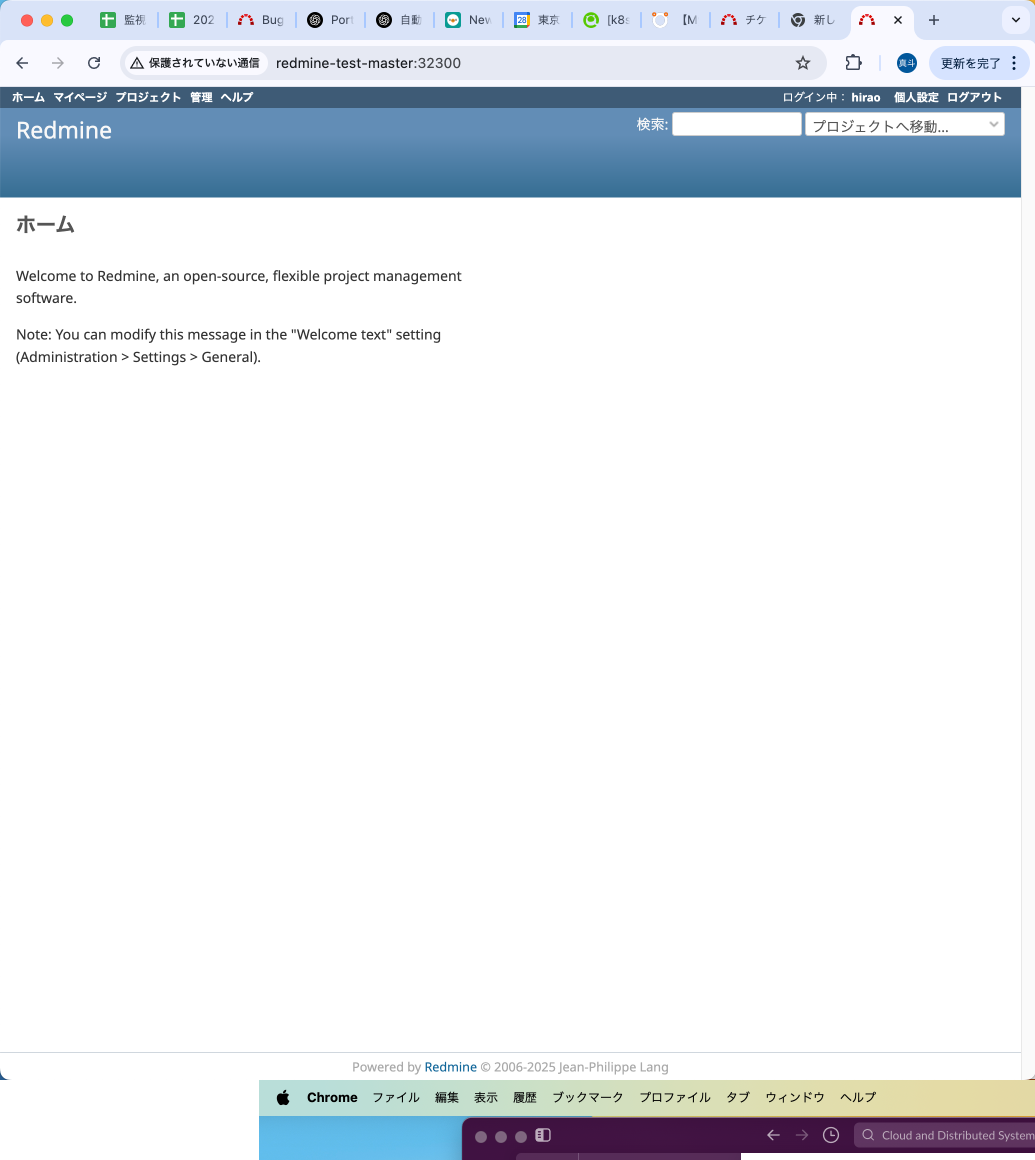
ブラウザでも確認しときましょう.
ログインまでできれば大丈夫でしょう.あとは適宜確認してみてください.